Appearance
canvas绘制标签阴影
效果图: 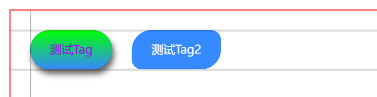
示例代码
vue
<template>
    <view class="content">
		<canvas class="page" canvas-id="myCanvas"></canvas>
		<div style="top: 20rpx;" class="line row"></div>
		<div style="top: 60rpx;" class="line row"></div>
		<div style="left: 20rpx;" class="line column"></div>
    </view>
</template>

<script setup>
	import { onReady } from '@dcloudio/uni-app'
    import Canvas from './canvas/index.js'
    onReady(() => {
        let ctx = new Canvas('myCanvas')

		let endX = ctx.draw_Tag('测试Tag', {
			top: 20,// 距离顶部距离(必填)
			left: 20,// 距离左侧距离(必填)
			height: 40,// 高度(必填)
			padding: 20,// 左右边距(必填)
			radius: [20],// 圆角 写法同正常样式的圆角一样
			fontSize: 12,// 字体大小(必填)
			fontColor: '#aa00ff',// 字体颜色(必填)
			fontStyle: 'sans-serif',// 字体样式(无需包含字体大小和行高,仅补充其他属性)
			bg: '#358aff',// 背景色
			// 渐变背景
			bg_linear: {
				deg: 0,
				colors: [{
						color: '#358aff',
						position: 0
					},
					{
						color: '#00ff00',
						position: 1
					},
				]
			},
			shadow: '4 10 12 rgba(0,0,0,0.6)',// 阴影
		})
		ctx.draw_Tag('测试Tag2', {
			top: 20,
			left: endX + 20,// 根据返回的结束X位置向右偏移20rpx
			height: 40,
			padding: 20,
			fontSize: 12,
			radius: [20, 10],
			bg: '#358aff',
			fontColor: '#FFFFFF',
			fontStyle: 'sans-serif',
			// shadow: '4 10 12 rgba(0,0,0,0.6)',
		})
    })
</script>
<style>
    .content {
		margin: 30rpx auto;
		height: 600rpx;
		width: 600rpx;
		position: relative;
		border: 1rpx solid red;
	}

	.page {
		width: 600rpx;
		height: 300rpx;
	}

	.line {
		background: rgba(0, 0, 0, .3);
		position: absolute;
		z-index: 10;
	}

	.column {
		width: 1px;
		height: 100%;
		top: 0;
	}

	.row {
		width: 100%;
		height: 1px;
		left: 0;
	}
</style>
canvas/index.js
js
let ratio = uni.getWindowInfo().windowWidth / 750
/**
* @typedef {object} object_bg_linear 渐变背景
* @property {number} deg 渐变角度(0-360)
*/
/**
* @typedef {object} tagStyle
* @property {number} top 到顶部的距离
* @property {number} left 到左边的距离
* @property {number} height 标签高度
* @property {number} padding 左右边距
* @property {number} fontSize 文字大小
* @property {string.ColorString} bg 标签背景色(不传时会清空setFillStyle,导致tag背景色变为黑色)
* @property {object_bg_linear} bg_linear 渐变标签
* @property {number[]} radius 同css的border-radius写法类似,默认为[0,0,0,0]
* @property {number} fontStyle CanvasContext.font 除了fontSize的其他配置
*/
export default class Canvas {
/**
* @param {string} canvasId canvasId
*/
constructor(canvasId) {
if (!canvasId) return Error('请传入canvasId')
this.ctx = uni.createCanvasContext(canvasId)
}
/**
* 绘制Tag
* @param {string} text tag [必须]文本
* @param {tagStyle} style tag [必须]样式
*
* @example 绘制两个tag,第二个根据第一个设置左侧边距
* let canvas = new Canvas('myCanvas')
* // 绘制第一个tag
* let endX = canvas.draw_Tag('测试Tag',
* {
top:20,
left:20,
height:40,
padding:20,
fontSize:12,
bg:'#358aff',
bg_linear: {
deg: 0,
colors: [{
color: '#358aff',
position: 0
},
{
color: '#00ff00',
position: 1
},
]
},
fontColor:'#FFFFFF',
radius:[20],
fontStyle:'sans-serif',
shadow:'4 10 12 rgba(0,0,0,.6)',
}
)
canvas.draw_Tag('测试Tag2',
{
top:20,
left:endX+20,
height:40,
padding:20,
fontSize:12,
radius:[20,10],
bg:'#358aff',
fontColor:'#FFFFFF',
fontStyle:'sans-serif',
shadow:'4 10 12 rgba(0,0,0,.6)',
}
)
*/
draw_Tag(text, style) {
let {
top,
left,
height,
fontSize,
fontColor,
fontStyle,
bg,
padding=0,
radius = [0, 0, 0, 0],
} = style
if (!top) {
console.log(text + '-->[tagStyle]', style);
console.error(text + '-->tagStyle.top错误: ', top);
}
if (!left) {
console.log(text + '-->[tagStyle]', style);
console.error(text + '-->tagStyle.left错误: ', left);
}
if (!height) {
console.log(text + '-->[tagStyle]', style);
console.error('tagStyle.height错误: '+'['+text+']', height);
}
// 设置字体样式 获取文本宽度
this.setFont(fontSize * ratio, fontStyle)
let width = this.ctx.measureText(text).width
if (style.shadow) { // tag阴影设置
let arr_shadow = style.shadow.split(' ').filter(item => item !== '')
this.ctx.setShadow(Number(arr_shadow[0]) * ratio, Number(arr_shadow[1]) * ratio, Number(arr_shadow[2]) *
ratio, arr_shadow[3])
}
switch(radius.length){
case 1:
radius.length = 4
radius.fill(radius[0])
break
case 2:
radius.push(radius[0])
radius.push(radius[1])
break;
case 3:
radius.push(radius[1])
break
}
this.ctx.save()
this.ctx.beginPath()
radius.map((item, index) => {
if (index == 0) {
if (item == 0) {
this.ctx.moveTo(left * ratio, top * ratio)
} else {
this.ctx.arc(
(left + item) * ratio,
(top + item) * ratio,
item * ratio,
Math.PI,
1.5 * Math.PI
)
}
}
if (index == 1) {
if (item == 0) {
this.ctx.lineTo((left + padding * 2) * ratio + width, top * ratio)
} else {
this.ctx.arc(
(left + padding * 2 - item) * ratio + width,
(top + item) * ratio,
item * ratio,
1.5 * Math.PI,
2 * Math.PI)
}
}
if (index == 2) {
if (item == 0) {
this.ctx.lineTo((left + padding * 2) * ratio + width, (top + height) * ratio)
} else {
this.ctx.arc(
(left + padding * 2 - item) * ratio + width,
(top + height - item) * ratio,
item * ratio,
0,
0.5 * Math.PI
)
}
}
if (index == 3) {
if (item == 0) {
this.ctx.lineTo(left * ratio, (top + height) * ratio)
} else {
this.ctx.arc(
(left + item) * ratio,
(top + height - item) * ratio,
item * ratio,
0.5 * Math.PI,
Math.PI)
}
}
})
this.ctx.closePath()
this.ctx.setFillStyle(bg)// bg_linear线性渐变需要裁剪区域,裁剪前绘制一次生成阴影
this.ctx.fill()
// 设置渐变样式
if(style.bg_linear){
this.ctx.clip()
// 根据角度计算起始和终止点位坐标
let sx = left
let sy = top
let ex = left
let ey = top
let deg = style.bg_linear.deg
if(deg%360 == 0){
sy += height
}else if(deg==90){
ex = left+padding*2+width/ratio
}else if(deg==180){
ey += height
}else if(deg==270){
sx = left+padding*2+width/ratio
}else if(deg>0&°<90){
sy += height
ex = left+padding*2+width/ratio
ey = Math.tan(deg)/height+top
}else if(deg>90&°<180){
ex = left+padding*2+width/ratio
ey = Math.tan(deg)/height+height+top
}else if(deg>180&°<270){
sx = left+padding*2+width/ratio
ey = Math.tan(deg)/height+height+top
}else if(deg>180&°<270){
sx = left+padding*2+width/ratio
sy += height
ey = Math.tan(deg)/height+top
}else if(deg>270&°<360){
sx = left+padding*2+width/ratio
sy += height
ey = Math.tan(deg)/left*-1 - top
}
console.log(`起始位置(${sx},${sy})`);
console.log(`结束位置(${ex},${ey})`);
let grd = this.ctx.createLinearGradient(
sx*ratio,
sy*ratio,
ex*ratio,
ey*ratio
)
style.bg_linear.colors.map(item=>{
grd.addColorStop(item.position,item.color)
})
this.ctx.setFillStyle(grd)
this.ctx.fill()
this.ctx.restore()
}
if (style.shadow) { // 阴影清空
this.ctx.setShadow(0, 0, 0, '')
console.log('阴影清空: ',text);
}
// 绘制文本
this.ctx.setFillStyle(fontColor)
this.ctx.fillText(
text,
(left + padding) * ratio,
(top + height / 1.65) * ratio
)
this.ctx.draw(true)
return left + padding * 2 + width / ratio
}
setFont(fontSize, fontStyle) {
this.ctx.font = `${fontSize}px/1 ${fontStyle}`
this.ctx.setFontSize(fontSize)
}
}